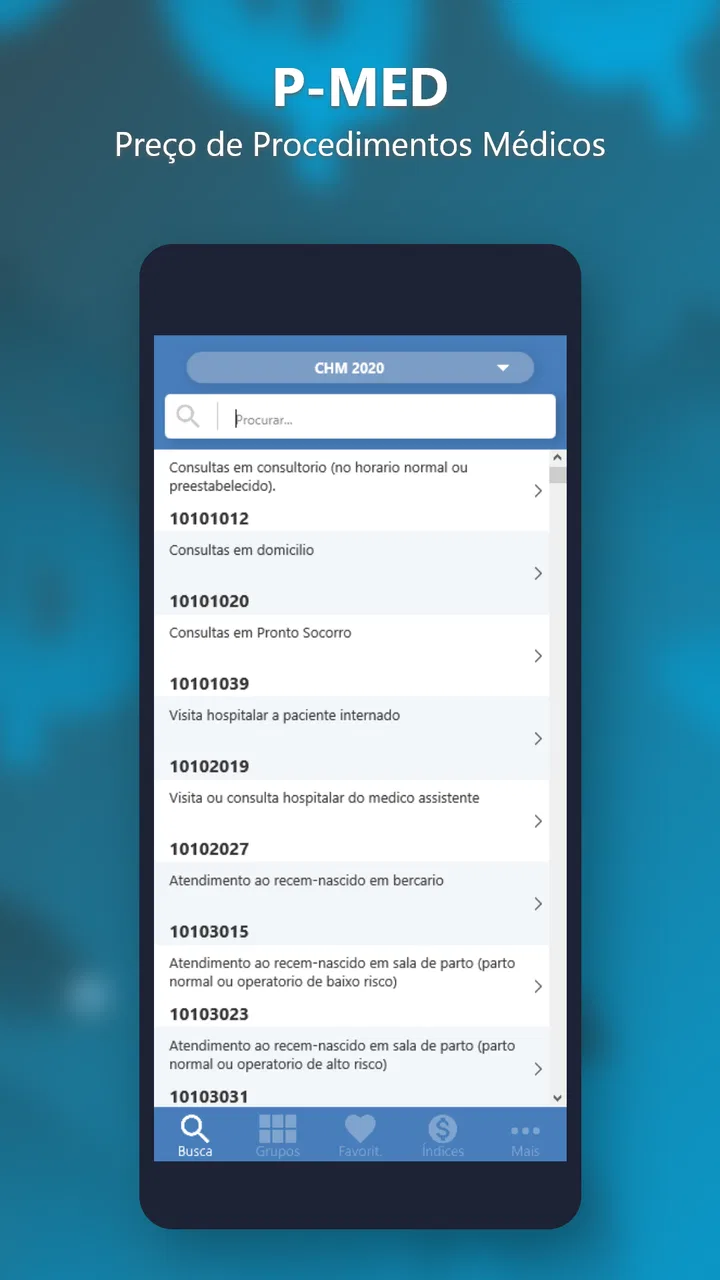
PMED - Preço de Procedimento
- 0.0
- Rating
- 10.00K
- Installs
- $4.99
- Price

 Analysis by App-foxy
When I first opened PMED - Preço de Procedimento, I understood its purpose quickly: it is a focused medical app for calculating procedure prices and comparing TUSS with other pricing tables. That narrow focus is its main appeal. It is not trying to be a general health guide, a patient symptom checker, or a replacement for professional billing software. Instead, it gives people who work with medical procedures a compact way to consult and calculate values while they are away from a desktop.
My overall impression is that PMED makes the most sense as a practical reference tool for Brazilian medical billing routines. The developer, OAZEZ Software & Tecnologia, has kept the concept direct, and the app’s long presence on Android suggests that it has been built for a specific professional audience rather than for casual browsing. It is listed in the Medical category, carries an Everyone age rating, and currently appears as version 17.7 for devices running Android 6.0 or later.
The app costs $4.99, with optional in-app items priced between $0.99 and $1.99. That makes the purchase decision fairly simple: if you regularly need procedure-table references, the focused workflow can justify paying for it; if you only need to look up a medical code once in a while, a browser, spreadsheet, or existing office system may be more convenient. I would not recommend installing it merely out of curiosity. Its value depends on whether its particular calculation and comparison tools fit your daily work.
You May Also Like

 Blood Strike: 2.5 Anniversary
Blood Strike’s Loadouts Turn Every Drop Into a Tactical Gamble
A close look at Blood Strike’s custom loadouts: how fast access to signature weapons reshapes its battle royale rhythm, rewards preparation, and narrows the gap between fights.

 Pandora - Music & Podcasts
Pandora’s Music Is Easy to Start, but Harder to Recover
Pandora’s strength is its low-effort path from a seed to a station. Its weak spot is how much confidence it asks you to place in connection, setup, and quiet recovery.

 8 Ball Pool
 Is Built on Rivalries, Rematches, and Routine
A close look at the rivalries, rematches, shared routines, and unanswered safety questions that turn a quick pool match into a persistent mobile community.

 Samsung Music
’s Quiet Strength Is Playing What You Already Own
Its reach comes less from spectacle than from dependable access to a personal library. That simplicity is both the app’s strongest retention engine and its ceiling.

 AccuWeather: Weather Radar
AccuWeather Review: A Quick, Clear Forecast for Everyday Decisions
For everyday plans, the best forecast is the one you can understand quickly. AccuWeather makes rain timing, radar, and local conditions easy to act on, with a few trade-offs.

 Hill Climb Racing
Why Hill Climb Racing Still Turns Crashes Into One More Run
A tiny car, a bumpy hill and one more upgrade: Hill Climb Racing keeps resurfacing because its simple chaos makes every near-miss feel personal.
More From Our News Desk
View All News


How the everyday workflow feels
The most useful way to approach PMED is to treat it as a working calculator with table references, not as an educational medical encyclopedia. I would begin with the procedure I need to evaluate, identify the relevant entry, and then compare the result against the applicable table or pricing reference. That sequence sounds basic, but it matters because the app’s usefulness comes from reducing the number of separate places I need to consult.
In a real office scenario, a receptionist, clinic administrator, or billing assistant might receive a request for the price of a procedure while handling several other tasks. Instead of opening a desktop file, searching through printed material, and manually checking whether the value belongs to TUSS or another table, the user can use PMED as a quick consultation point. I see this as especially helpful when the question is routine but time-sensitive: confirming a procedure reference before preparing an estimate, checking a value during a conversation, or reviewing a calculation before passing it to a colleague.
The important habit is to separate reference work from final financial approval. I would use the app to organize the lookup and calculation, then confirm that the selected table, procedure description, and local billing rules are appropriate before sending a quote. A calculator can make arithmetic easier, but it cannot decide whether a particular agreement, insurer, clinic policy, or contract applies to a case.
That distinction also prevents one of the most common mistakes with specialized medical tools: assuming that a displayed value is automatically the final amount a patient or organization should pay. Procedure pricing can depend on context, and PMED should be part of a review process rather than the only authority in a complicated claim.
Who gets the most from it
I think PMED is best suited to people who already understand the language around medical procedures and pricing tables. Clinic administrators, medical office staff, billing professionals, and practitioners who handle their own administrative work are the clearest audience. They are more likely to recognize when two entries look similar, when a table needs careful interpretation, and when a result requires a second check.
It can also be useful for students or newly hired administrative staff who are learning how procedure references are organized, provided that a more experienced person reviews their work. The app’s focused design may help them become familiar with recurring terms and calculation steps, but it should not be treated as a substitute for training in billing rules.
Patients may find it less suitable. Someone trying to understand the cost of a single procedure could become confused by technical table names or by the difference between a reference value and a negotiated price. For that audience, asking the clinic for a written explanation is usually clearer. PMED is more valuable to the person preparing or checking the estimate than to the person simply receiving it.
What I would check before relying on a result
My first check would be the procedure description. Similar wording can lead to different interpretations, and a fast search is not enough if the result is going into a formal estimate. I would read the full entry, compare related options, and make sure I have not selected a nearby procedure with a different scope.
Next, I would confirm which reference table is being used. The ability to come across TUSS and other tables is useful precisely because different references may produce different values or serve different purposes. That flexibility is also a source of risk: switching between tables without noticing can make an otherwise correct calculation misleading.
I would then record the context of the calculation outside the app. A simple note containing the procedure, selected table, date of consultation, and person who reviewed it can make later questions much easier to answer. This is one of the more practical habits an experienced user can develop around PMED. The app helps with the immediate lookup, while the surrounding record keeps the result understandable when a quote is revisited.
Another useful habit is to avoid calculating several unrelated procedures in one uninterrupted session. I prefer completing one request, checking it, and then starting the next. That reduces the chance of carrying the wrong procedure or table into a new calculation, especially when several entries have similar names.
Settings, repeatable habits, and faster patterns
PMED is not the kind of app where I would expect a long list of personalization controls. Its strength is the direct medical pricing task, so I would spend my attention on the choices that affect interpretation rather than searching for cosmetic adjustments. Before using it seriously, I would inspect the available table or calculation options and learn which selection is the normal starting point for my workplace.
That small preparation makes a difference. If I already know whether a request usually concerns TUSS or another reference, I can move through the app with fewer interruptions. I would still verify the choice for every unusual case, but routine work becomes less vulnerable to accidental switching. This is a better use of settings than changing options simply because they are available.
For teams, consistency is more important than individual speed. I would agree on a shared sequence: identify the procedure, select the reference table, calculate, review the description, and save the result in the office’s normal record. PMED can support that sequence, but the consistency comes from the people using it. When everyone follows the same pattern, a colleague can reproduce a calculation instead of receiving only an unexplained number.
A second advanced habit is to create a small internal list of frequently requested procedures outside the app, using whatever record system the workplace already trusts. I would not treat that list as a replacement for checking PMED, because reference values and interpretations can require fresh verification. Instead, the list acts as a navigation aid: it tells me which procedures deserve careful attention and which terms are commonly confused in our routine.
When I need to work quickly, I would use a two-pass method. In the first pass, I locate the procedure and obtain the preliminary value. In the second, I deliberately reread the selected table and procedure description before communicating the result. This is faster than correcting an error after an estimate has already been sent, and it avoids relying on memory when two entries appear close together.
The app’s Android compatibility also makes it practical for users who keep an older phone dedicated to administrative work. Since the minimum requirement is Android 6.0, it does not demand a recent device. That can be convenient in a clinic where the phone used for quick references is not the newest one. I would still keep the device maintained and protected, because medical-office work deserves care even when the app itself is being used only as a reference.
Where it is faster than common alternatives
Compared with a paper table, PMED should be easier to consult when I am away from the filing cabinet or when a procedure needs to be checked during a phone call. Compared with a general web search, its specialized purpose can reduce irrelevant results and make the lookup feel more controlled. Compared with a spreadsheet, it may require less manual setup for someone who wants a dedicated procedure-price reference rather than a custom financial model.
Those comparisons have limits. A spreadsheet is often better when a clinic needs custom formulas, a visible audit trail, multiple staff members editing the same file, or a detailed history of estimates. A full practice-management or billing platform is stronger when the task includes patient records, invoicing, permissions, reporting, and integration with other administrative processes. PMED should not be judged as a complete replacement for those systems because it is aimed at a narrower job.
For a solo practitioner who only handles a few procedures, the app’s compact approach may be enough. For a large organization with complex contracts and approval chains, it is more likely to be one small tool in a wider workflow. Knowing that boundary before purchasing is important. The app is most convincing when the user wants focused access, not when the user expects an entire medical administration suite.
Limitations that affect serious use
The same specialization that makes PMED convenient can make it feel limited. I would not expect it to explain every billing exception, interpret every contract, or replace the judgment of someone experienced with medical pricing. A user who wants extensive documentation, collaborative review, or a complete history of changes may need another system alongside it.
There is also a learning curve for anyone unfamiliar with TUSS and related references. The app may help locate information, but it cannot remove the need to understand what the entries mean. New users should work with supervision at first, particularly when a calculation will affect a patient estimate or an organizational payment.
The paid model is another practical consideration. The upfront price is not high for a professional reference tool, but the optional purchases mean that I would review exactly what I need before adding anything else. I would avoid buying extras simply to unlock possibilities I do not use. For occasional users, those costs may make a free browser-based reference or an existing workplace resource more attractive.
I would also avoid assuming that a phone-based calculation is automatically suitable for formal documentation. A small screen encourages quick decisions, and quick decisions are not always appropriate for unusual procedures. My preferred approach is to use PMED for speed, then move the confirmed information into the clinic’s established record or quotation process.
Questions I would answer before installing
If you are wondering whether it works for patients, my answer is: it can help a patient-facing professional prepare information, but I would not recommend it as a self-service medical pricing guide for most patients. The terminology and table distinctions are easier to handle when the user already understands the administrative context.
If you are asking whether it replaces a spreadsheet, I would say no. It is more convenient for focused lookup and calculation, while a spreadsheet offers greater control over custom formulas, notes, history, and reporting. I would choose PMED when the recurring need is procedure-table consultation, and a spreadsheet when the recurring need is building a broader financial workflow.
If you are concerned about using it on an older Android phone, the listed minimum of Android 6.0 is reassuring. Still, I would test the workflow on the specific device used at work and make sure the screen is comfortable for reading detailed entries. Compatibility is only one part of practical usability.
If you are unsure whether the price is worthwhile, I would measure it against repetition rather than against the number of features. Someone who checks procedure values every week may gain more from a dedicated tool than someone who needs one answer every few months. The app earns its place through recurring convenience, not through being a broad all-purpose medical application.
Finally, if you are asking whether the result can be sent directly to a patient or insurer, I would add a review step. Confirm the procedure, table, calculation, and any applicable agreement first. PMED can support that preparation, but the responsibility for the final communication remains with the professional or organization handling the case.
My verdict after using it as a focused reference
PMED - Preço de Procedimento is a specialized Android medical app with a clear purpose: helping users calculate procedure prices and compare TUSS with other tables. The current version is 17.7, and its history since Aug 22, 2012 gives it the feel of a mature niche product rather than a newly assembled utility. It has more than 10K installs, which fits its targeted audience: useful to the right professionals, but not designed for everyone.
I like the app most when I imagine it in a repeatable office routine. I can identify a procedure, check the relevant reference, calculate a value, and then review the result before recording it. That workflow is simple, but it addresses a real source of friction for people who otherwise move between printed tables, web searches, and manually maintained files.
My recommendation comes with a clear condition. Buy it if you regularly work with procedure pricing and want a dedicated mobile reference. Skip it if you need patient records, invoicing, collaboration, extensive reporting, or a full billing platform. I would also skip it as a casual patient unless a medical-office professional has explained how to interpret the tables.
For experienced users, the best results come from disciplined habits: confirm the procedure wording, verify the selected table, use a two-pass review, and keep a separate record of important calculations. Those practices do more for reliability than rushing through the interface. In my view, PMED is most valuable as a dependable lookup companion, not as the final authority on a medical bill.
That makes it a worthwhile, narrowly focused purchase for the people it serves. It will not solve every administrative problem, and it should not be mistaken for a complete healthcare management system. But when the job is checking and calculating procedure prices on an Android device, its direct approach can save time and make a recurring task easier to handle with care.
FAQs for PMED - Preço de Procedimento
01What is PMED - Preço de Procedimento used for?
PMED - Preço de Procedimento is designed to help users consult and compare reference prices for medical, dental, or healthcare procedures. It can be useful for patients who want a clearer idea of potential costs before contacting a clinic or professional. The app is best viewed as an information and planning tool, rather than a replacement for an official quotation or personalized consultation.
02Are the prices shown in PMED final and guaranteed by healthcare providers?
No. The prices displayed in PMED should generally be treated as estimates or reference values, not guaranteed final charges. The actual amount may vary depending on the professional, clinic, city, materials used, complexity of the procedure, examinations, anesthesia, and additional services. Before scheduling treatment, users should confirm the complete price, payment conditions, and possible extra fees directly with the provider.
03Does PMED include every medical or dental procedure and provider?
PMED may offer a broad procedure-price database, but users should not assume that every treatment, specialty, clinic, or professional is listed. Coverage can depend on the app’s available database, region, and the information supplied or updated by its publisher. If a procedure does not appear, or the result seems incomplete, contacting a qualified provider remains the safest way to obtain accurate and current information.
04Is PMED - Preço de Procedimento free to download and use?
The availability of free features, paid options, subscriptions, or other charges can depend on the version of PMED and the platform where it is downloaded. Users should check the app store listing before installing, paying particular attention to in-app purchases and subscription terms. Even when access to price information is free, professional consultations, examinations, and the procedures themselves are not included.
05Does PMED provide medical advice or allow users to book procedures?
PMED is primarily focused on procedure-price information and should not be used to diagnose conditions, recommend treatment, or replace advice from a licensed healthcare professional. Its features may also be limited to consultation and comparison rather than direct booking or payment. Users should discuss symptoms, treatment choices, risks, and scheduling with a qualified provider before making any healthcare decision based on information found in the app.
Pros
- Helps compare procedure prices before contacting a healthcare provider.
- Useful for quickly checking typical costs in different medical specialties.
- Simple interface makes price searches easy for occasional users.
- Can support better budgeting for planned medical procedures.
- Practical reference tool for patients researching private healthcare costs.
Cons
- Prices may vary by city
- clinic
- professional
- and treatment complexity.
- Listed values may not include exams
- materials
- anesthesia
- or follow-up care.
- Portuguese-focused content may be difficult for users unfamiliar with the language.
- Price information can become outdated as healthcare fees change.
- It should not replace a formal quote or advice from a qualified provider.

PMED - Preço de Procedimento
Gallery